
• Follow our Instagram!
  • Curious about what we're currently doing about bots? Check out the latest updates from staff in this thread.

Programming Pokémon Showdown Pro


icon.png


Pokémon Showdown Pro
Your battles. Your tools. One desktop app.

Windows • macOS • Linux

Download • GitHub / Source Code
​

Hi everyone!

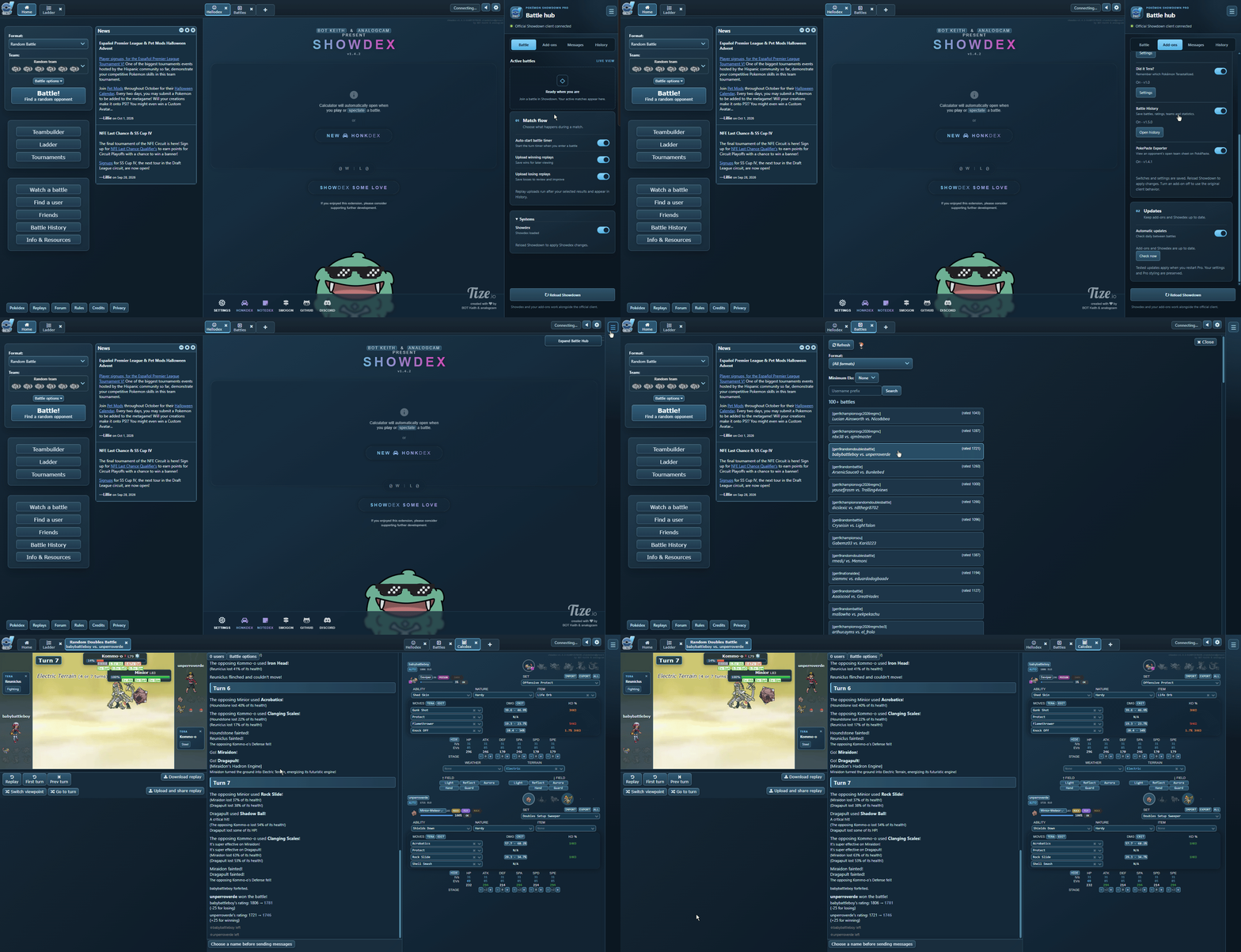
I'd like to share Pokémon Showdown Pro, a desktop app that brings together the official live Pokémon Showdown client, Showdex, and several existing community add-ons.

The goal is to make these tools easier to use together, with a consistent interface and a dedicated panel for managing battles, settings, and replays. You still connect to the official Showdown service and sign in through its normal interface.

Preview​


showcase.gif


What does it include?​


  • Pro theme — Matching styling across Showdown, Showdex, menus, dialogs, and add-on windows. Pro is the default, with Light and Dark themes also available.
  • Integrated Showdex — Keep the damage calculator alongside your battles without setting up a separate browser extension.
  • Both Showdown clients — The new client is selected by default, and the classic interface remains available.
  • Battle Hub — A collapsible panel for active battles, add-on controls, optional match messages, results, and replay links.
  • Battle review tools — Battle History includes records, rating charts, Pokémon statistics, favorites, and filters.
  • Saved preferences — Your teams, login, themes, and tool settings persist between launches.

Included add-ons​


The following add-ons are bundled, with individual switches and settings in the Battle Hub:

  • Enhanced Tooltips — Type effectiveness, move details, and optional base stats.
  • Randbats Tooltip — Possible random battle sets and probabilities.
  • Three Island — PokéPaste previews, team importing, and item/Tera icons.
  • Did it Tera? — Compact reminders showing a Pokémon's Tera type.
  • Battle History — Local battle records and statistics.
  • PokePaste Exporter — Team sheet viewing and exporting in battles with open team sheets.

Battle Hub and replays​


The Hub includes an optional automatic battle timer, customizable greeting and closing messages, and session/lifetime win, loss, and tie tracking.

Replay uploading is optional, with separate settings for wins and losses. Confirmed uploads appear in the History tab, which keeps your 20 most recent replay links.

You can also collapse the Hub for more space or toggle fullscreen using its button or F11.

Updates​


Pro checks for app, Showdex, and add-on updates between battles.

Installed Windows builds and original Linux AppImages can download app updates, with an explicit restart action once your battles finish. Windows portable builds, extracted Linux builds, and macOS builds offer the matching release download.

Showdex and add-on updates are checked against both Showdown clients before installation. Failed checks keep the current versions, and updates that fail to load can roll back to the previous version.

Download and setup​


Download the latest release here

  • Windows: Use the installer, or extract the entire portable ZIP and open Pokemon Showdown Pro.exe.
  • macOS: Choose Intel or Apple Silicon, then move Pokemon Showdown Pro.app to Applications. Builds are currently unsigned.
  • Linux: Make the AppImage executable and launch it, or extract the TAR.GZ build and run pokemon-showdown-pro. The first successful launch creates desktop/application-menu shortcuts where supported.

Release downloads include the required runtime and tools, so you don't need to install Node.js, npm, or a local Showdown server. An internet connection is required for online play.

Feedback​


This is the first public release, and I'd appreciate feedback from anyone who tries it—especially on macOS and Linux.

If something doesn't work, please reply here or open a GitHub issue. Including your operating system, app version, package type, and any error message or screenshot will help me investigate.

Suggestions for interface improvements and useful features are welcome too!

Credits and source​


This project builds on Pokémon Showdown, Showdex, Electron, and the work of the included add-on creators. Full credits and third-party licenses are available in the repository notices.

Pokémon Showdown Pro is an independent fan-made project and is not affiliated with or endorsed by Pokémon Showdown. The app is open source under AGPL-3.0-or-later.

Discord​


For questions, feedback, or to share your setup, you can also join the community:


​
 
Pokémon Showdown Pro v1.1.2

Hi everyone! This update adds independent zoom controls for Showdown and Showdex, improves the Battle Hub, and fixes a few battle interface issues across the classic and new clients.

Independent Zoom Controls

You can now resize Showdown and Showdex separately while keeping the Battle Hub at its normal size. This should help if you prefer a larger battle interface but a smaller calculator, or the other way around.

  • Separate Showdown and Showdex zoom controls in both the expanded and collapsed Battle Hub.
  • 5% adjustments, with a range of 50% to 200%.
  • Individual reset buttons to return either view to 100%.
  • Keyboard shortcuts and Ctrl + mouse wheel support.
  • Zoom preferences stay saved between sessions and when reloading Showdown.
  • Improved Showdex sizing when the client and calculator use different zoom levels.

Battle Interface Fixes

  • Fixed the Open Calcdex button covering the Download Replay button after a battle.
  • Fixed Enhanced Tooltips omitting known Tera types from Pokémon tooltips.
  • Unrevealed opponent Tera information remains hidden.
  • Improved Calcdex layouts at different zoom levels and window sizes.

Battle Hub Improvements

  • Added styled hover labels for all zoom controls, matching the Pro, Light, and Dark themes.
  • Improved tooltip positioning so labels don't cover nearby controls.
  • Improved spacing and alignment in the collapsed Battle Hub.

Download: Pokémon Showdown Pro
Source: GitHub repository

Feedback and bug reports are welcome! If you run into a layout issue, please include your operating system, whether you're using the classic or new client, and your Showdown/Showdex zoom levels. Screenshots are helpful too.
 
Last edited:

Pokémon Showdown Pro v1.2.0

Pokemon Showdown Pro Theater Mode..png

Hi everyone!

Version 1.2.0 is now available! This is a larger update that introduces an in-app Replay Browser, a new Theater Mode for battles and replays, and expanded Streamer Mode controls. It also includes improvements to Showdex, themes, battle layouts, and several bug fixes across both Showdown clients.

Replay Browser​

You can now browse and watch Pokémon Showdown replays directly inside Pro without opening an external browser.

  • Browse recent replays or search by username and battle format.
  • Open replay links by pasting a URL.
  • Your Replays provides quick access to your own uploaded replays.
  • Private replay support allows you to access private replays when signed in.
  • Showdex integration lets you use the calculator while watching replays.
  • Theater Mode support provides a larger, more focused replay viewing experience.

Theater Mode​

Theater Mode provides a more spacious layout for both live battles and replays, giving you additional control over how battle information is displayed.

  • Added collapsible Chat and Calcdex panels.
  • Collapsed panels automatically reposition above or below the expanded panel to maximize available space.
  • Improved sidebar sizing to give Showdex more room without unnecessarily shrinking the battle.
  • Improved the classic client's user list while Theater Mode is active.

Streamer Mode​

The previous Privacy Mode has been renamed to Streamer Mode, with additional options for controlling what appears in the dedicated capture window.

Existing Privacy Mode preferences are preserved automatically.

You can now individually choose whether viewers can see:

  • Battle Hub
  • Showdex
  • Moves and switches
  • Pokémon tooltips
  • Tera reminders
Additional improvements:

  • Renamed the capture window to Showdown Pro Stream.
  • Improved stream rendering, recovery, and overall reliability.
  • On Windows, minimizing the stream window now keeps it running behind the main client instead of interrupting capture.

Theme and Interface Improvements​

This update also includes several visual improvements across the Pro, Light, and Dark themes.

  • Improved theme consistency throughout Theater Mode, replay browsing, sidebars, buttons, and scrollbars.
  • Changed Showdex's default theme to Showdown, allowing it to automatically follow the active client theme.
  • Improved Pokémon tooltip visibility during battles.
  • Fixed Tera reminder positioning after switching tabs.
  • Corrected exposed interface corners and other styling inconsistencies.
  • Removed unnecessary scrollbars from replay controls.
  • Removed unused chat input space while watching replays.

Battle Layout Improvements​

  • Corrected HP bar alignment across battle layouts.
  • Reduced unnecessary spacing beneath HP bars.
  • Preserved status badges beneath Pokémon plates.
  • Improved doubles battle spacing in the Light and Dark themes.
  • Adjusted Showdex sidebar sizing to display more calculator information while preserving battle space.

Team Sheet Import Fixes​

  • Fixed duplicate Import buttons appearing when importing team sheets.
  • Fixed extra blank Pokémon being added to imported teams.
  • Imported teams now use the source player's username when available.

Reliability and Bug Fixes​

  • Fixed Reload Showdown getting stuck on Connecting… during live battles or replays.
  • Improved recovery when the stream window encounters rendering issues.
  • Improved battle and replay layouts when switching tabs, expanding panels, or changing viewing modes.

Download​

Download Pokémon Showdown Pro

GitHub Repository / Source Code

Available for Windows, macOS, and Linux.

Feedback​

As always, feedback and bug reports are welcome!

If you encounter any issues with the new Replay Browser, Theater Mode, Streamer Mode, or battle layouts, please reply here or open an issue on GitHub.

When reporting a problem, including your operating system, whether you're using the classic or new Showdown client, and a screenshot if applicable would be especially helpful.

Thanks to everyone who has tried Pokémon Showdown Pro and shared feedback so far. I hope you enjoy the update!
 
Back
Top